Computer Support - Rated E for Everyone

  • Subscribe to our RSS feed.
  • Twitter
  • StumbleUpon
  • Reddit
  • Facebook
  • Digg

Sunday, 23 April 2006

Software for Remote Support - Blog

Posted on 12:47 by Unknown

The entry in this blog describes an online remote support software solutions. http://spaces.msn.com/remotesupport/blog

This next blog is similar to this one in that it has entries from a tech support person invloved in day to day activities while problem solving pc and network issues. This guy has it toough or great depending on how one looks at it. He is all over the place. He not only does computer desktop support, but also does networking design and troubleshooting plus VoIP (voice over IP). That is a lot of technology to be involved in at once but like I said it depends on how it is looked at. The one thing that I do have a problem with is that he has my posting name and I can't do anything about it. http://bloglines.com/blog/Puppet
Read More
Posted in | No comments

Thursday, 20 April 2006

Kentrox Q2200 & Q2300 - Remote Desktop Access

Posted on 13:22 by Unknown

This notification email is intended to inform everyone in our company involved in the selection or ordering of networking gear for VoIP solutions.
As we know, our company has deployed many VoIP solutions. As time and the number of deployments has increased, our internal VoIP knowledgebase has incremented accordingly. Although the phone system brand per deployment may differ, the underlying networking equipment is often from the same manufacturer and in many cases, the same manufacturer model. Although in some respects debatable, several of the most problematic VoIP deployments include Kentrox networking equipment installed as part of the solution.
A common denominator in both point-to-point and VPN flavored VoIP installs that have been the most troublesome are Kentrox models Q2300 and Q2200. Although both units price very competitively, the gains achieved with the low upfront cost have been negated due to technical overhead applied in efforts solve poor voice-over-ip quality issues. More intangible but not to be ignored, is the cost to the company's reputation of delivering solid VoIP solutions. Although it's not a guaranty that another vendors equipment would have not resulted in similar issues, the uncertainty and doubt in future VoIP deployments arising from the Kentrox units having been involved in past problem deployments is certain.
It's recommended that Kentrox models Q2200 and Q2300 are no longer included in proposals for neither point-to-point or VPN VoIP solutions. They can still play a role as an inexpensive T1 CSU/DSU router/firewall for single ISP internet access but even for those solutions another vendors equipment, such as product offerings from Adtran or Cisco, may price equally as well and should be considered.
Read More
Posted in | No comments

VoIP Quality :: Network Connection & Access

Posted on 06:20 by Unknown

So far:
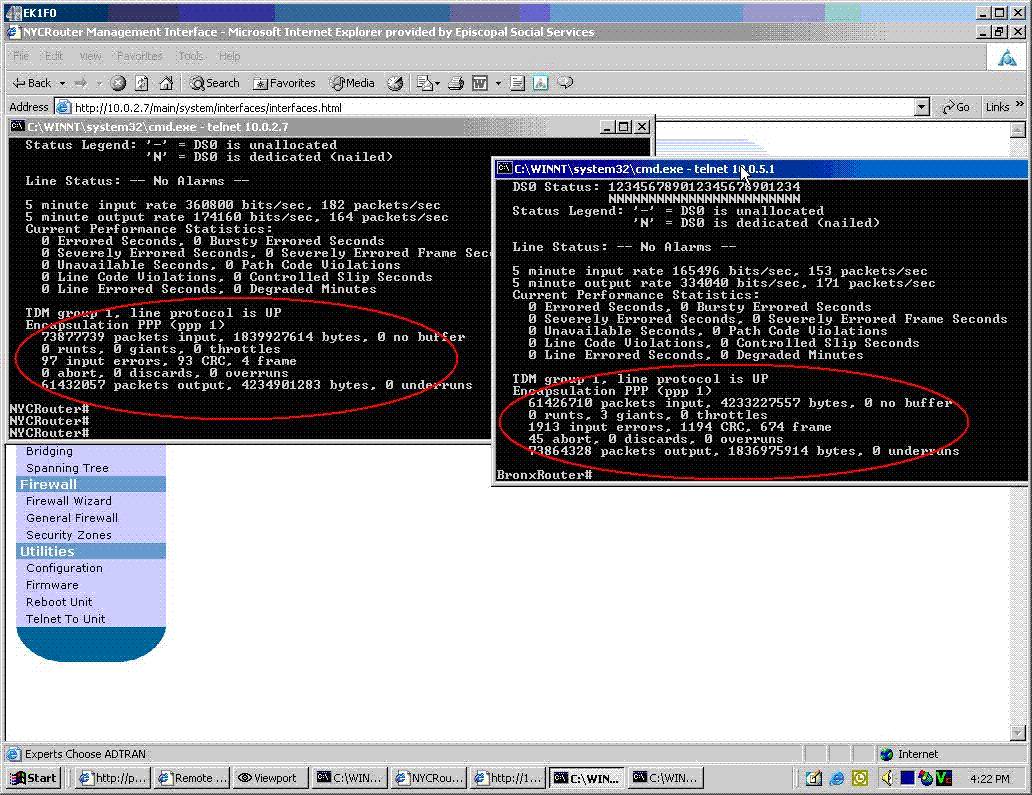
Wednesday April 19th - 4:00pm to 5:15pm
The image above shows numerous CRC and frame errors as reported by the Adtran units that connect the point-to-point T1. The count is higher on the Bronx side (right side of the image). I cleared all of these stats when I was last logged on a week and half to two weeks ago so I am sure they have all occurred since then. I cleared them again yesterday. After clearing the statistics, I started a file download from a desktop in the Bronx the to a desktop I was logged into in Manhattan and while the download was taking place, asked ESS to place a call to the Bronx. Unfortunatly, the counters did not increment as quickly as I expected. There was only one CRC and one Frame error on the Bronx side. However, this is still an indication that there are line problems.
I checked the configurations on the NEC systems and the Adtran units and they are as I left them. I can only verify configurations for the aforementioned equipment since I viewed for accuracy or adjusted the configurations to provide acceptable voice quality the last time this issue was addressed. I cannot say other devices or new devices on ESS's network are not causing a problem. ESS did inform me that Verizon was in thier phone room for two days though it was not disclosed to me what work they were performing. Charles was also at ESS just recently but was there for training and not modifying the configurations of the NEC phone systems.


Sent: Wednesday, April 19, 2006 6:31 PM
Subject: S-ESS

Please be sure to inquire of the hrs spent today on the ESS problem . I want you to track and bill the customer for this IT time.
Also the client s/b made aware that if we work on this tomorrow or the next that the time is and will be billable.

Please acknowledge.

Thank you.
Read More
Posted in | No comments

Tuesday, 11 April 2006

Netvanta Desktop or Rack Mount Chassis Router

Posted on 10:34 by Unknown
Netvanta Desktop or rack mount chassis Router

Netvanta 3200 Series router is a very versatile and feature rich device for networking both poin-to-point type connections between offices and for internet gateways. The model comes in both desktop and rackmount flavors. The current release of their software is 12.x. Almost all common or general configuring can be done from the GUI which is browser based. With version 12 QoS could be configured using a wizard. If you prefer command line their OS is ver similar to Cisco's IOS. That feature was an intelligent design for ADTRAN to commit to as the learning curve to maneuver around on the unit if the GUI is inaccesable is very small. The unit can be accessed remotely for remote configuration through telnet or a browser.
Compare the Netvanta 3200 to Cisco 1700
Read More
Posted in | No comments

Saturday, 8 April 2006

Benefits of Online Remote Access PC Support.

Posted on 05:27 by Unknown
Quote from http://spaces.msn.com/4remotesupport/

Online PC Remote Support Software

The cost saving benifits of remote control software are easily calculated. Anyone can derive from the use of remote support software the numerous advantages from just the description of such software. Online pc remote support software permits the remote control of computers on the internet. By gaining access and control of a remote computer for support, countless tech support functions can be permormed so much quicker than by having to visit the site or office or attempt to diagnose and solve problems over the phone. As is the case often, the tech may know what the problem is but guiding an inexperienced computer user or wvwn worse an unwilling participant to click on different windows and menus and then communicate information back to the tech support person on the phone often makes what could be 10 support session turn into 5 times that amount of time.
Remote control desktops over the web through the internet can save precious time and from a business aspect that means dollars. Effeciency of support staff increases many fold and remote control software or on-demand remote desktop support solutions cost much less than adding salaries.

Remote Support Software

Many of the major hardware and software vendors are using on-demand remote support software to increase their profit margins and stay competiative within their market segment. Vendors such as dell, cisco, hp, and others are commiting large amounts of money into online remote support solutions but in the end, save many times what they spend (almost forgot to mention microsoft - rdp?). RDP for remote control is also one of my favorite solutions for pc remote control over the web. The problem I have with it at times is the need to have access and control of the networking equipment at the remote side to make the chnages needed to allow the applications communication through to the inside network. Although, I must add that dell dropped it's remote support solution after having some great complications with it. They may have been too early to adapt such a strategy and the pc os platform was switching from me to 2000.
Read More
Posted in | No comments

Thursday, 6 April 2006

Remote Support Software

Posted on 10:06 by Unknown
Cost is also not an issue compared to huge businesses. However, since they cannot allocate the required budgetary funds to initiate a huge marketing campaign for their remote support software solution and computer services, it is hard to find one.

Computer remote control on the web

The new and rapidly growing trend in computer support and consulting seems to be that of remote support. In particular, the ability to provide quick remote desktop support through computer remote control on the web. Although computer remote control on the web for online remote support is not a new concept in theory or practice, the number of support proffessionals looking to provide their own without the extra effort that was once involved to gain remote access to a system over the web has grown tremendously. This is not a short term fad, this is a business tool for the support industry. The number of services and packaged support products available on the market today to choose from is tremendous. IT support companies have come to realize and recognize that to be competative in business, they need visibility and be seen nationwide and even world wide. They should offer affordable services without sacrificing quality. http://spaces.msn.com/4remotesupport/ Through the use of remote support software, companies have become successful connecting to their clients without the need of travel. This setup is both beneficial to the company and the consultants. 4RemoteSupport is one of the companies pursuing this business model. Need more information. Obtaining remote support tools to remote control computers on the web is not just soght out for companies that provide support to their customers, this too lor service is seeing tremendous growth with IT departments or orgainization that support only their own employees and staff.
Read More
Posted in | No comments

Tuesday, 4 April 2006

Cisco 2811XM Installed fine

Posted on 14:40 by Unknown

A local bank has asked my company to swap out some aging routers for new Cisco 2811XM series routers for the branches and a couple of 3825 series for the core. the first of the branch routers went in today with out a hich. I prepped the router i nthe office; updates the IOS and setup the config to match the old. The difference being this unit had different port enumerations. I did call in for some tech support on a DR site branch. I must say Cisco's TAC is not as good as it used to be. below is an image of the 2811XM router. They are bit larger that the 2600 series.

Tech support software to allow remote computer control through the web:

Software for PC Remote Support

The application allows for access to remote computer users computers through the web for support. Once connected, the technician can work on desktop applciations, operating system problems, misconfigurations, or network router (internet routers too). More Info:

Software for PC Remote Support

Previous post entries with similar topic:

http://remotesupportpc.blogspot.com/2006/10/remotely-support-desktops-over.html

http://remotesupportpc.blogspot.com/2006/06/remote-support-software.html

Blog:

Evolution of Technology and Support - Desktop Tech Support

Read More
Posted in 2811XM, cisco, computer, desktop remote support software, Internet, networking, pc, router | No comments

remote support

Posted on 10:27 by Unknown

Yes, the lingo could definately be confusing.

I want to be sure the service would be a fit for what you are trying
to do.
What the system provides is a mechanism or a way to get control of a
remote computer over the internet. The remote computer's user logs
into the site using your email address. Once logged in, they are
presented with a connect button and a download program link. These
both do the same thing but go about it differently. They click on the
connect button and remote control software downloads to their computer
and with pre-configured information, that's the information you enter
on your profile page, and automatically connects to your computer
running the viewer. Your viewer pops open on your computer and you
see and can control thier computer. If the automatic download fails,
this will happen if they do not have Java installed, they can run the
executable program wich will also connect automatically to your viewer
with pre-configured information.

Now, the port forwarding is the part that does confuse some people. I
have to add at this point that we are working on a major update to
remove this requirement, I have no release date however. On your
router, in your case a netgear, a port forward or virtual server is
setup. What this does is it allows the remote computer's software
that's downloaded to get through to your computer from the internet
side of the router to your computer on the LAN.

Every progrma that communicates on a network uses and IP address and a
port. It's not a real port it's a software port. This is how the
computer knows what software is talking to or listening to the
network.

So on the netgear, the only requirement is that software communicating
on port 5500 (the default) from the internet is forwarded to the
computer on the LAN that has the viewer listening for it. The port
is forwarded to the IP address of the computer on the LAN. Usually
addressed with the last number changing like you described - .1, .2,
.3. . A complete address as an example will look like 192.168.1.1,
192.168.1.2, 192.168.1.3, etc..

So a cumputer on your local LAN will have the viewer running on it and
listening on port 5500 for connections from computers that "want" to
remote controlled. The netgear will have the port forward configured
to point 5500 to the IP address of the computer with the viewer on
your LAN. When a remote user logs in with your email address and
clicks connect, software downloads to their system and connects to
yours and you control thier computer.

The security is such that if anyone connects to you, your viewer, you
have control of them and not the other way around. You could always
exit the viewer once a session is complete to feel more secure. Once
a session is active, no one can steal the session or redirect it.
Although the remote control software we use has the capability of
encryption we don't apply it although we may add a checkbox on the
profile page to permit our customers to turn it on or off as they
require. The encryption makes the software run much slower. This is
not just our system, it's everyones even the very expensive flavors.
Our sessions are quick. You could pay 1,000.00 plus more for another
service that is doing encryption right now but it won't be faster I
have to caveate the last comment with the fact that network
conditions make a difference too. The encryption really has not
worried our current base since they know that encrypting a stream
that is just them remote controlling a computer to fix a printer
setup or the end-users email program or any other common support
issue isn't a security breach. The end user is already logged in
since they have to be to initiate the download so there's no
passwords being entered to steal - which is unlikely anyone could do
so anyway.

I hope this helped. If you have more questions please ask them, I will
be very happy to answer them for you.

If you need assistance configuring the netgear, please send me the
model number since the configuration screens differ on different
models. The model number is usually displayed somewhere on the unit.

Thank you,

Customer Support Group

> very interested in your product, how secure is it in protecting information
> while communicating with the remote desktop.
> Also I am running off a router, where do I find a "Viewer Port Number"?
> could that be the .2, .3, or .1 (depending on computer) on the net gear ip
> address?
> I know you say it is simple to set up but when you don't really know the
> lingo you get confused.
> also am I understanding that I just need to install this on the computer I
> want people to have access to?
> Thanks for your help

Read More
Posted in | No comments
Newer Posts Older Posts Home
Subscribe to: Comments (Atom)

Popular Posts

  • (no title)
    test
  • remote support
    Yes, the lingo could definately be confusing. I want to be sure the service would be a fit for what you are trying to do. What the system pr...
  • Computer Support - Forum,Tech Information,Downloads, Etc.
    Really cool site I found - my.techsupport.ca They have way too much to list. It's not just the information and links they have but the f...
  • Citrix printing nightmare.
    Computer Support - Adventure (Rated PG) Added a second Citrix server to our network. The old one ia presentation server 3.0 and the new on...
  • PC Remote Control Software for Computer Desktop support over the Internet
      On Demand PC Remote Control Online Over The Internet.   For pretty affordable computer remote support software  on demand over the I...
  • Cisco 2811XM Installed fine
    A local bank has asked my company to swap out some aging routers for new Cisco 2811XM series routers for the branches and a couple of 3825 s...
  • Software for Remote Support - Blog
    The entry in this blog describes an online remote support software solutions. http://spaces.msn.com/remotesupport/blog This next blog is sim...
  • Desktop Remote Support Software
    Desktop Remote Support Software Supporting multiple desktops dispersed in a large geographical areas is challenging. In some cases, the geog...
  • Cisco 2811 Branch Router Install - Remote & On-site Support
    This project for the bank is a small piece of a larger project and its scope is straight forward and fairly simple. The bank is a very good ...
  • A Browser Active Sync Test URL
    https://owa.{yourdomain.gr}/Microsoft-Server-ActiveSync/ The URL could even be http if SSL is not configured on the server to be required....

Categories

  • 2007
  • 2008 r2
  • 2811XM
  • 4.5
  • 6
  • access
  • access denied
  • Active
  • adtran
  • assist
  • attachment
  • bandwidth
  • barracuda
  • blackberry
  • block
  • boot
  • Browser
  • Browser Active Sync Test URL
  • busy
  • calendar
  • cisco
  • citrix
  • client
  • cloud
  • computer
  • computer desktop server control access support
  • conferencing
  • config
  • control
  • control panel
  • database
  • desktop
  • desktop remote support software
  • DVD
  • email
  • enabled
  • exchange
  • exchange 2003
  • exchange 2010
  • filter
  • find
  • firewall
  • forwarding
  • frame-relay
  • free
  • gigabit
  • handheld
  • help desk
  • helpdesk
  • HMC
  • HMC 4.5
  • hosted
  • IaaS
  • IAD
  • iis
  • information. calendar
  • Internet
  • ISO
  • ISP
  • kaseya
  • kentrox
  • linksys
  • livemeeting
  • MAC
  • malware
  • manage
  • meeting
  • microsoft
  • NDR
  • network
  • networking
  • odbc
  • online
  • outlook
  • outlook 2000
  • outlook 2002
  • outlook 2003
  • outlook web app
  • OWA
  • pc
  • pc anywhere
  • pcanywhere
  • PDA
  • permission
  • portable
  • printers
  • q series
  • QoS
  • radmin
  • relay
  • remote
  • remote access
  • remote access tool
  • remote administrator
  • remote control tool
  • remote support
  • removal
  • router
  • scanner
  • send as
  • server
  • session printers
  • software
  • solution
  • sonicwall
  • spam
  • SRW2024
  • stuck
  • superantispyware
  • support
  • switch
  • Sync
  • T1
  • telecommuting
  • Test
  • to open
  • tool
  • trojan
  • unable
  • URL
  • users
  • utility
  • vbscript
  • virtualized
  • virus
  • Vista
  • VMWare
  • vnc
  • VoIP
  • web
  • web based
  • win7
  • windows
  • windows 7
  • workstation
  • xenapp

Blog Archive

  • ►  2012 (3)
    • ►  August (1)
    • ►  January (2)
  • ►  2011 (2)
    • ►  December (1)
    • ►  November (1)
  • ►  2010 (1)
    • ►  January (1)
  • ►  2009 (2)
    • ►  June (1)
    • ►  May (1)
  • ►  2008 (11)
    • ►  December (1)
    • ►  August (2)
    • ►  May (1)
    • ►  April (1)
    • ►  March (2)
    • ►  February (4)
  • ►  2007 (11)
    • ►  November (1)
    • ►  October (1)
    • ►  June (1)
    • ►  May (3)
    • ►  March (1)
    • ►  February (3)
    • ►  January (1)
  • ▼  2006 (76)
    • ►  December (3)
    • ►  October (1)
    • ►  September (1)
    • ►  August (1)
    • ►  July (1)
    • ►  June (7)
    • ►  May (2)
    • ▼  April (8)
      • Software for Remote Support - Blog
      • Kentrox Q2200 & Q2300 - Remote Desktop Access
      • VoIP Quality :: Network Connection & Access
      • Netvanta Desktop or Rack Mount Chassis Router
      • Benefits of Online Remote Access PC Support.
      • Remote Support Software
      • Cisco 2811XM Installed fine
      • remote support
    • ►  March (10)
    • ►  February (13)
    • ►  January (29)
Powered by Blogger.

About Me

Unknown
View my complete profile